


RadioMaster AG01 MINI CNC Hall Gimbals for TX12 & Zorro Set (Black)
RadioMaster AG01 MINI CNC Hall Gimbals for TX12 & Zorro Set (Black) is backordered and will ship as soon as it is back in stock.
Couldn't load pickup availability
Shipping & Fufillment
Shipping & Fufillment
All items ship from our Calgary location/warehouse. For more shipping information visit our shipping policy page please note items listed as pre-order or special order will take longer to ship. Please note, couriers may differ in order to provide a quicker delivery.

RadioMaster AG01 MINI CNC Hall Gimbals for TX12 & Zorro Set (Bl...
Description
Description
From the aviation-grade aluminum construction, non-contact hall sensors, and pre-installed Sticky360 Mini Gimbal Sticks, be prepared to revolutionize your compact radio experience!
Package Includes:
1x AG01 MINI CNC Hall Gimbals for TX12 & Zorro Set (Black)
Features:
- Made with CNC processed aviation grade aluminum.
- Sticky360 Mini Gimbal Sticks as standard.
- Non contact hall sensors for accurate control inputs and precise centering.
- Quad precision bearings for unparalleled stick feel.
- Adjustable vertical travel angle (Min. 38°, Max. 54°).
- Custom designed for RadioMaster Zorro & TX12.
Specifications:
Name: AG01 Mini CNC Hall Gimbal
Sensor type: Hall Sensor
Working voltage: DC 3.3V
Linearity: Real-time (No delay)
Adjustable vertical travel range: 38°—54°
Self-centering adjustment : Yes
Easy mode adjustment
Adjustable tension : Yes
Quad bearing: Yes
Temperature range: -20°C-85°C
Size: 49*42*48mm
Weight: 42g(±0.3g)
Installation for Zorro & TX12
The AG01 Mini gimbals are shipped as self-centering by default and are compatible with both the Zorro and TX12 Radios.
For Zorro
The Zorro radio is configured as Mode 1 or Mode 2 by the screws mounted in the rear case of the radio. Both gimbals should be installed in self-centering configuration (as default out of the box) in the Zorro radio. Once the radio is re-assembled the screws in the rear case of the Zorro will set the throttle gimbal.
For TX12
One gimbal must be set as throttle and one as self-centering before installation in the radio.
1. Use the included screw (see parts bag) to hold down the centering lever and set the gimbal as a throttle gimbal.
2. Adjust the throttle tension bar until the desired tension is achieved.
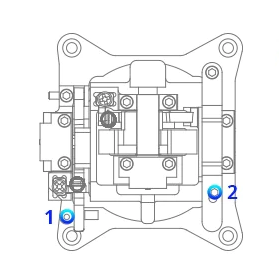
How to install AG01 MINI on Zorro
It’s not the easiest job to install these gimbals in the Zorro, but it’s doable with a little patience and planning. Thanks to Oscar Liang for the detailed graphic installation tutorial. Click here to check more details.
Payment & Security
Payment methods
Your payment information is processed securely. We do not store credit card details nor have access to your credit card information.
